RIPE Atlas Software Probes
Introduction
"Software probes" are software packages that work as RIPE Atlas probes without the need for any dedicated RIPE Atlas hardware. They are meant to be installed on infrastructure maintained by RIPE Atlas probe hosts themselves - e.g. on virtual machines, home routers, existing servers, etc. Various platforms and operating systems have different levels of support and ease-of-use. You can find which systems (hardware or OS) are supported, and how, below.
Good to know
As a (future) host of a RIPE Atlas software probe you are expected to:
- Understand what it means to operate a probe for the RIPE Atlas network, including what benefits they themselves gain from this and what services they provide to the RIPE network and its users. You can read more on the RIPE Atlas about page
- Install the software package applicable for your intended target hardware and OS. This software package can come from a variety of sources such as an official repository on GitHub. At the moment, the RIPE NCC maintains a binary packages for RPM (RHEL 8, 9, 10), DEB (Debian Bullseye, Bookworm and Trixie, and Raspberry Pi OS 12 and 13; arm64 and amd64) packages.
- Register your probe using the software probe registration form (see Register your software probe below)
- Keep the version of your software up-to-date by upgrading to newer versions as they become available
- Should the access credentials for your probe change (for example after having to reinstall a server that runs the software probe), you need to update the probe's public key in the SSH Key section of the Manage tab on your probe's page
Details of the conditions and responsibilities are available in the RIPE Atlas Terms and Conditions.
Please note that software probes can only be set up as "public probes".
RIPE Atlas software probe source code
The RIPE Atlas probe code can be found on GitHub: https://github.com/RIPE-NCC/ripe-atlas-software-probe
Configuration options
Regardless of how you install the software (see below), there are some configuration parameters that are different for software probes than for hardware probes. For example, the software probes by default do not report bandwidth usage - this needs to be explicitly enabled by the host.
The configuration options are documented in the README of the code repository on GitHub.
Install from the RIPE Atlas website
For Debian, Raspberry Pi OS and Enterprise Linux (RHEL, CentOS, Rocky Linux, AlmaLinux), the quickest way to install a software probe is the install page on the RIPE Atlas website:
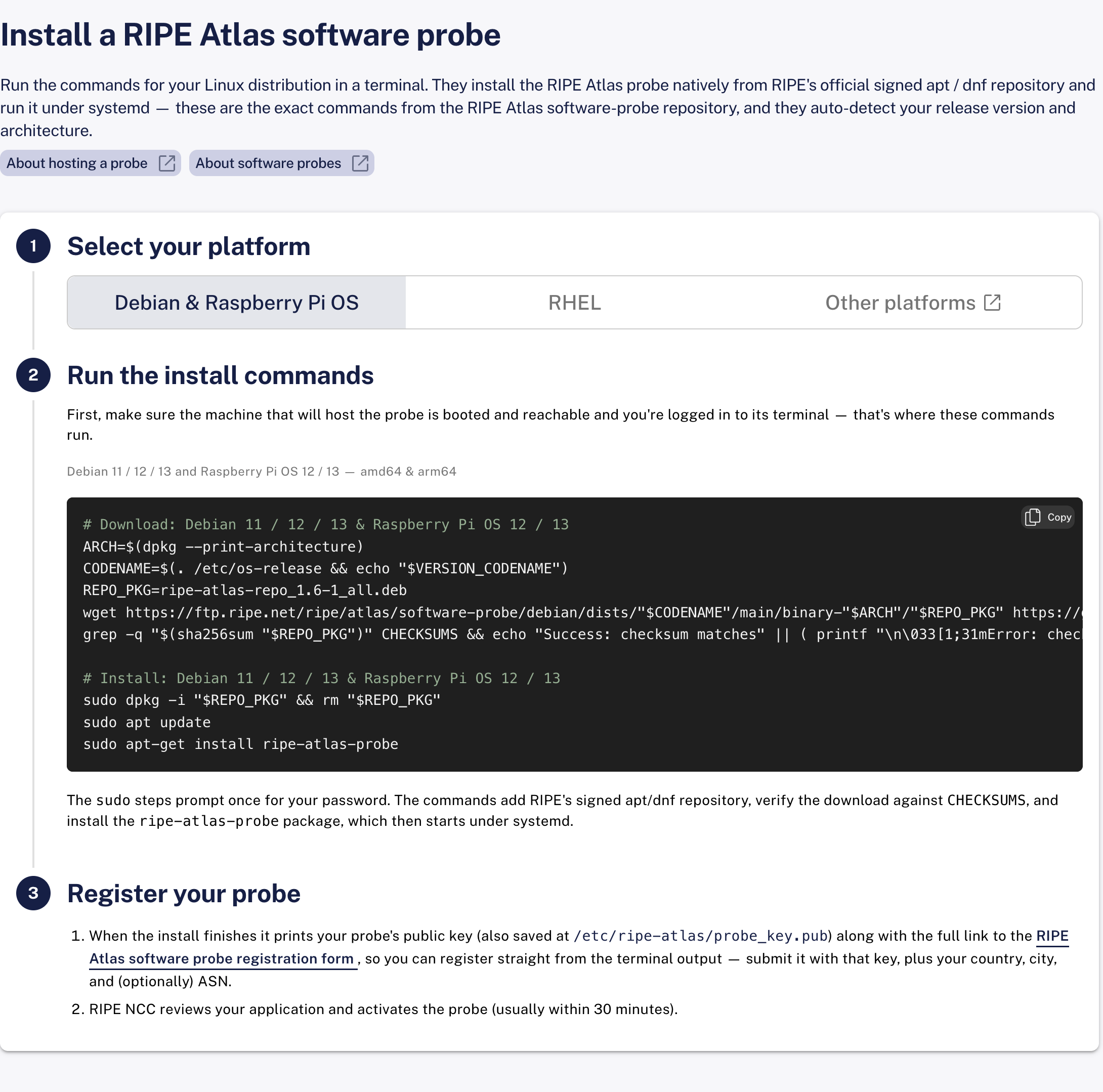
- Go to the probes page and click Install a Software Probe, or go straight to atlas.ripe.net/install/swprobe. You need to be logged in to see the install commands.
- Under Select your platform, choose Debian & Raspberry Pi OS (Debian 11, 12 and 13, Raspberry Pi OS 12 and 13; amd64 and arm64) or RHEL (RHEL, CentOS, Rocky Linux and AlmaLinux 8, 9 and 10). Other platforms takes you to the platform-specific installation instructions below.
- Log in to a terminal on the machine that will host the probe, click Copy and run the commands. They add the RIPE NCC's signed package repository, check the download against its checksum and install the
ripe-atlas-probepackage, which then starts automatically. The commands detect your release version and architecture themselves, and thesudosteps ask for your password once. - When the installation finishes, it prints your probe's public key (also saved in
/etc/ripe-atlas/probe_key.pub) and a link to the registration form. Use them to register your software probe.
Register your software probe
Once the software is installed, register the probe on the software probe registration form (you need to be logged in):
- Location: click anywhere on the map to drop a pin, or search for an address. You can drag the pin to fine-tune the exact location.
- Public Key: paste the contents of your probe's public key file,
probe_key.pub. Valid keys aressh-rsa(2048 to 4096 bits),ecdsa-sha2-nistp256orssh-ed25519, in the formatKEYTYPE KEYDATA [optional comment]. - Optionally, enter a Description and any Notes.
- Accept the RIPE Atlas Service Terms and Conditions and the RIPE NCC Privacy Statement, and click Submit your registration.
A location and a public key are both required. The software probe should be activated automatically within a few minutes. After that, it appears in the Mine tab of the probes page.
TIP
If you reinstall the probe and it gets a new key, don't register it again. Update the key in the SSH Key section of the Manage tab on your probe's page instead (see Managing Your Probe).
Platform-specific installation instructions
Below you can find help with installing the RIPE Atlas software probes.
We are maintaining a GitHub repo for manuals in different languages. Please let us know if you'd like to contribute by opening an issue or even a pull request!
| Platform | Support | Installation Manuals | Installation Videos |
|---|---|---|---|
| Debian 11 (binary) | RIPE NCC | English | |
| Debian 12 (binary) | RIPE NCC | English | |
| Debian 13 (binary) | RIPE NCC | English | |
| RHEL 8 (binary) | RIPE NCC | English | |
| RHEL 9 (binary) | RIPE NCC | English | |
| RHEL 10 (binary) | RIPE NCC | English | |
| Linux (source) | RIPE NCC | English | |
| Raspbian (source) | Community | English Spanish Chinese Indonesian Portuguese Russian Arabic Italian | Your video here? |
| Docker | Community | English (Jamesit) English (Knight1) English (CTassisF) - Alpine Linux / ARM | English |
| OpenWRT | Community | English | |
| Turris | Vendor (NIC.CZ) | English Spanish Chinese Portuguese | English |
Upgrading the probe software
You can find full upgrade instructions for every supported platform at https://github.com/RIPE-NCC/ripe-atlas-software-probe#upgrading
Please consider setting up automatic package upgrades if your platform supports this functionality. The instructions for setting up auto-upgrades are included in the above guide.
Please note that probes which are running old software versions will eventually be deprecated and prevented from connecting. We therefore ask you to update your probe(s) when possible.
When a newer version of the software probe is available, the Overview tab of your probe's page shows a banner with the version your probe is running and the latest version. The Mine tab of the probes page also marks out-of-date software probes with an update icon next to the probe ID.
Deprecated instructions
The following Linux versions have been declared end of life by the distribution maintainer. Because of this, the following software probe instructions are deprecated. Users are encouraged to migrate to a more recent distribution.
- As of Jun 30, 2022 Debian 9 has reached EOL.
- As of May 31, 2024 CentOS Stream 8 has reached EOL.
- As of Jun 30, 2024 CentOS 7 has reached EOL.
- As of Jun 30, 2024 Debian 10 has reached EOL.
| Platform | Support | Installation Manuals | Installation Videos |
|---|---|---|---|
| CentOS 7 (binary) | RIPE NCC | English Spanish Chinese Indonesian Portuguese Russian Italian | English |
| CentOS 8 (binary). | RIPE NCC | English Spanish Chinese Indonesian Portuguese Russian Arabic Italian | Russian |
| CentOS 7 & 8 (source) | RIPE NCC | English Spanish Chinese Indonesian Portuguese Russian Arabic Italian | Your video here? |
| Debian 9 (source) | Community | English Spanish Chinese Indonesian Portuguese Russian Arabic Italian | Your video here? |
| Debian 10 (source) | Community | English Spanish Chinese Indonesian Portuguese Russian Arabic Italian | English |