Internet Maps
The Internet Maps page, reached from Internet Maps in the sidebar, collects interactive maps built from the results of RIPE Atlas built-in and well-known measurements. You don't need to be logged in to use them.
There are currently two maps:
- Root Name Server Instances: which root DNS server instance each probe ends up querying
- RTT to well-known destinations: each probe's ping round trip time (RTT) to a popular Internet service
Both maps show one dot per probe and work the same way, as described in Using the maps.
Root Name Server Instances
atlas.ripe.net/maps/root-instances
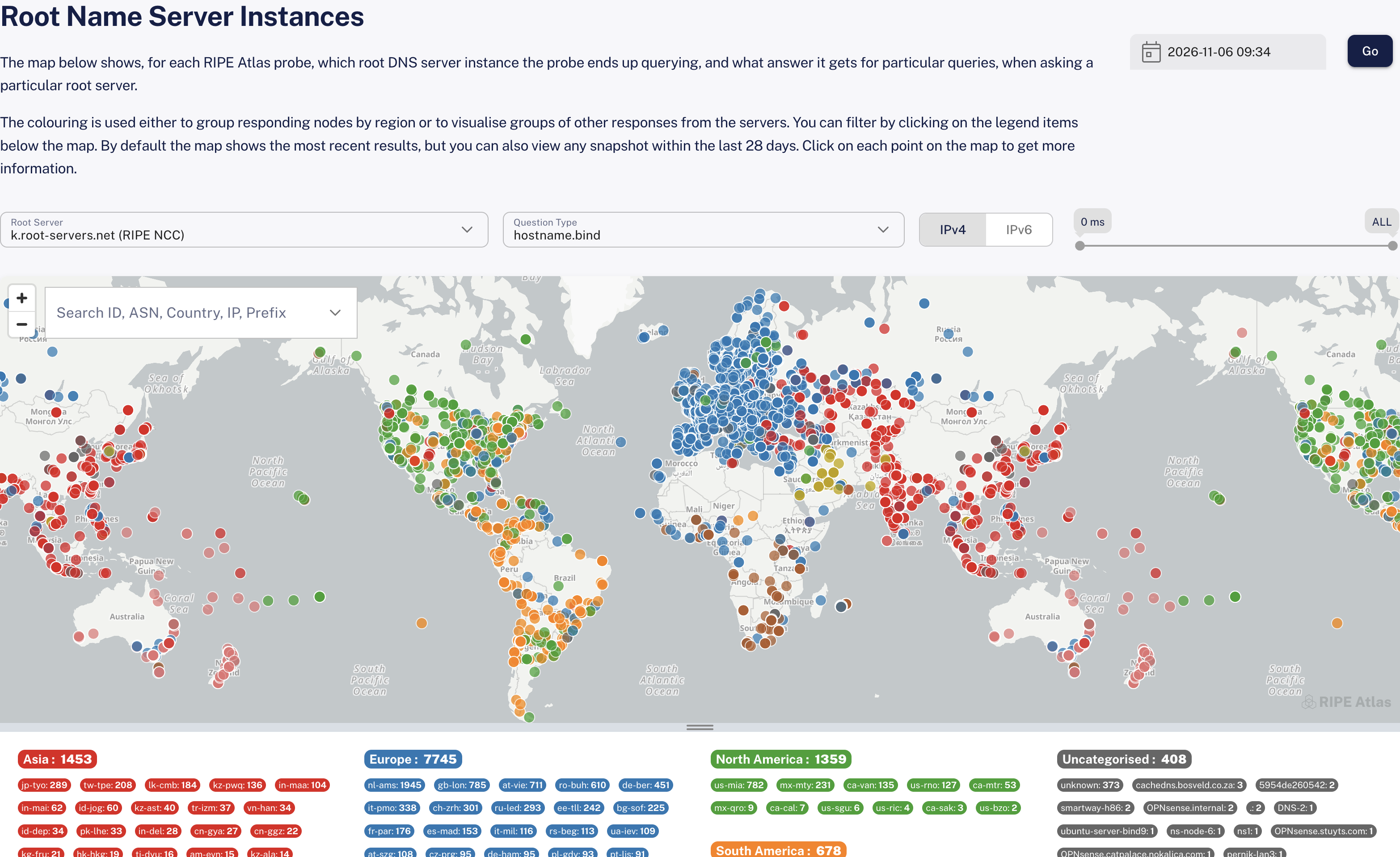
The root name servers are anycast services: each one is operated from many sites (instances) around the world. This map shows, for each RIPE Atlas probe, which instance of a particular root server the probe ends up querying, and what answer it gets for particular queries. In other words, it shows the "gravitational radius" of each root DNS server instance.
Choose what to show with:
- Root Server: one of the 13 root servers, from a.root-servers.net (Verisign) to m.root-servers.net (WIDE). The map starts with k.root-servers.net (RIPE NCC).
- Question Type: the query the probes send:
- hostname.bind or id.server: the name of the instance that answered. The probes are coloured by the region of that instance, for example Europe or Asia.
- version.bind or version.server: the software version the server reports. For version.bind, the versions are grouped by software.
- Serial using UDP or Serial using TCP: the serial number of the root zone the server is serving.
- IPv4 / IPv6: whether to show the results over IPv4 or IPv6.
The legend below the map lists the answers with the number of probes that got each one. For hostname.bind and id.server it is arranged by region, with the individual instances under each region. Click a region, an instance or an answer to show only those probes on the map, and click Total to show all of them again.
RTT to well-known destinations
atlas.ripe.net/maps/well-known
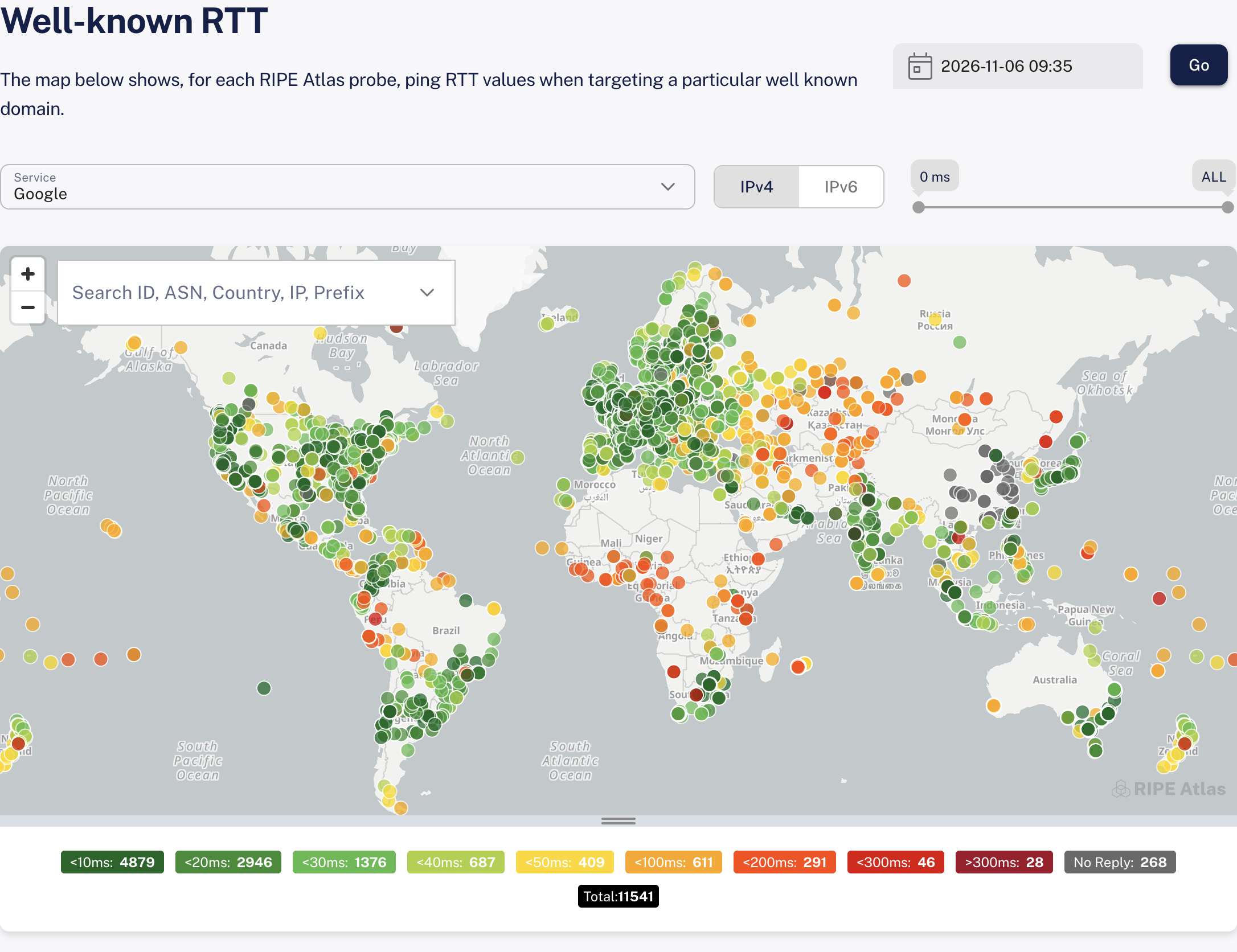
This map shows, for each RIPE Atlas probe, the ping RTT to a well-known destination, using the results of the well-known measurements. The page is titled Well-known RTT.
Choose what to show with:
- Service: the destination, such as Google, Cloudflare or Wikipedia. The map starts with Google.
- IPv4 / IPv6: whether to show the results over IPv4 or IPv6. Some services are only measured over IPv4. For those, the IPv6 option is greyed out, and its tooltip says No IPv6 measurements available for this domain.
Probes are coloured by their RTT. The legend below the map groups them into ranges from <10ms to >300ms, with the number of probes in each. Click a range to show only those probes, and click it again to show all of them.
Using the maps
Choosing a date and time
By default, each map shows the most recent results (shown as LATEST in the date picker). To see an earlier snapshot, pick a date and time and click Go. You can go back up to 28 days.
- If you choose a moment more than 28 days ago, the map opens at the earliest data available instead, and a message tells you so.
- You cannot choose a moment in the future.
Changing the server, service, question or address family updates the map straight away. A new date and time only takes effect when you click Go.
Filtering by RTT
Use the range slider above the map to show only probes whose RTT falls within a range, from 0 ms up to 300 ms. When the upper handle is at the far right, it shows ALL and no upper limit is applied.
Searching and exploring
- Use the Search ID, ASN, Country, IP, Prefix box above the map to find particular probes.
- Click a probe on the map to see more information about it, including its response and RTT.
- Below the map, Total shows the number of probes with results. On the root instances map with hostname.bind or id.server, Showing gives the number of probes left on the map after your legend selection, search and RTT range.
- Drag the handle at the bottom edge of the map to make it taller or shorter.
Sharing a view
Your choices (server or service, question, address family, date and time, and RTT range) are kept in the page address. Copy the address from your browser to share exactly the same view. A link to a moment that is now more than 28 days ago opens at the earliest data available.
The maps start in your preferred address family (IPv4 or IPv6), if you have set one in your preferences.